
Semaphore Uncut · Semaphore
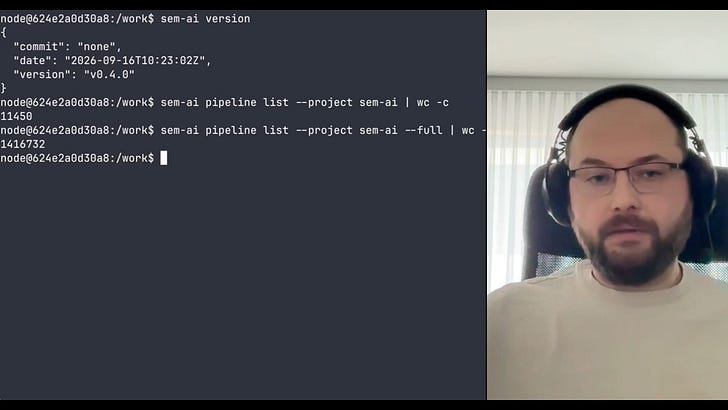
AI coding agents can generate and modify code quickly. But to work effectively with CI/CD, they need focused information, clearly defined permissions, and safeguards that prevent unsuitable changes from progressing. The new sem-ai 0.4.0 release improves all three areas. In our latest product news video, Nick demonstrates more compact pipeline responses, flexible context switching, and the ability to create and validate Semaphore preflight checks directly with an AI coding agent. Get the essential pipeline information Requests for Semaphore workflows and pipelines now return a much more compact response by default. In the demonstration, the new response was approximately 99 percent smaller than the previous full output. This gives an AI coding agent the essential pipeline information without filling its context window with unnecessary detail. The complete output is still available when needed. Results can also be limited or filtered by date. This makes sem-ai more efficient by default while giving developers control over how much information the agent receives. Switch between permission contexts sem-ai 0.4.0 also introduces a context flag. You can define separate contexts for different Semaphore organizations or service accounts, then select the appropriate one through a command line flag or an environment variable. For example, one service account could have read only access for reviewing code and investigating pipeline failures. Another could have permission to modify Semaphore configuration. This supports a safer, least privilege approach. An AI agent receives the access required for its current task without automatically receiving broader control. Create preflight checks with your coding agent The release also adds support for Semaphore’s preflight checks API. Preflight checks evaluate a request before a workflow starts. Teams can use them to enforce organizational rules, including required branch naming conventions. In the video, Claude Code creates a preflight check for a Semaphore project. It configures a branch naming rule, adds the check, and tests it against several branches. Workflows from accepted branches continue normally. Branches that do not follow the required pattern are blocked before the pipeline begins. This gives teams another way to turn delivery policies into enforceable safeguards, directly from the development environment where the agent is working. One limitation remains. The init job configuration used by preflight checks cannot yet be modified programmatically. The Semaphore team plans to address this in a future update. sem-ai 0.4.0 is available now Plugins for Claude Code and Codex will update automatically. If you use the sem-ai command line interface directly, it will notify you when the new version is available and provide the command needed to install it. Watch the full demonstration to see sem-ai 0.4.0 in action. Explore the project on GitHub, or create a Semaphore account to try it with your own...
0:00SPEAKER_00Hi, I'm Pete, and here's the latest product update from Semaphore.
0:04SPEAKER_00We have released Sem AI version 0.4.0 with three improvements
0:10SPEAKER_00that make it more efficient and safer for AI coding agents to work
0:14SPEAKER_00with your CI-CD system.
0:17SPEAKER_00First,
0:17SPEAKER_00Sem AI now returns much more compact information about workflows and pipelines
0:23SPEAKER_00by default.
0:24SPEAKER_00In our demonstration, the new response was approximately 99% smaller than the full output.
0:31SPEAKER_00This gives your coding agent the essential information
0:33SPEAKER_00without filling its context window with unnecessary details.
0:37SPEAKER_00You can still request the complete output when you need it.
0:40SPEAKER_00You can also limit the results and filter pipelines by date.
0:44SPEAKER_00The second improvement is context switching.
0:47SPEAKER_00You can define different semaphore contexts for different organizations
0:51SPEAKER_00or service accounts,